![Flinn-Logo (1)-2.png]](https://help.flinncomply.com/hs-fs/hubfs/Flinn-Logo%20(1)-2.png?height=43&name=Flinn-Logo%20(1)-2.png)
When Flinn detects a change in a monitored regulation, standard, or guidance document, the Document Detail View becomes your essential workspace for in-depth analysis and formal assessment. This view centralizes all information and tools needed to understand the change and determine your company's required compliance actions.
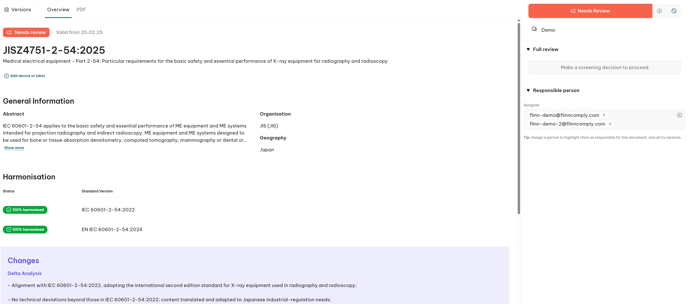
Overview Section
At the top of the page, you’ll see essential information about the regulatory document:
-
Status Indicator – Displays the current workflow stage, e.g., Needs Review, In Progress, or Completed.
-
Document Identifier – Regulation or standard reference (e.g., JISZ4751-2-54:2025).
-
Title – Full name of the document, describing its scope or purpose.
-
Tags – Smart tags or product-related labels (e.g., MammoScan, Tomography) for quick filtering and categorization.
General Information
This section provides detailed metadata about the document, including:
-
Abstract – A short description of the document’s contents and application.
-
Organisation – The issuing body or standardization organization (e.g., JIS).
-
Geography – The jurisdiction or region the document applies to.
You can expand the abstract to view the full text for additional context.
Harmonisation
The Harmonisation block displays whether the document is harmonised with other standards, such as EN, ISO, or IEC equivalents.
You’ll see both the harmonisation status and the standard version (e.g., IEC 60601-2-54:2022).
This helps you identify equivalent or aligned standards across regions.
Change Analysis
The changes between versions are analyzed by AI. We can add this into your Flinn account upon request - if you are interested in having Delta- and Impact Analysis there, please reach us at support@flinncomply.com
The impact summary is specified to medical device manufacturers. If you want this to be tailored to your product portfolio, please reach out to us.
Screening & Review Actions
On the right-hand side, you’ll find the Screening and Full Review panels — these guide you through the change management workflow.
-
Screening Status – Indicates whether a review is needed (Needs Review, Relevant, Not Relevant).
-
Make a Screening Decision – Once the initial review is done, select whether the change is relevant and proceed to full evaluation if necessary.
-
Full Review Panel – Provides access to detailed evaluation fields where reviewers can document findings, upload files, and finalize assessments.
For more information also see Change Management Workflow.
Responsible Person
Below the review actions, you can assign or view the responsible person(s) for each regulatory document.
Assigning responsibility ensures clear ownership, accountability, and notification flow during the evaluation process.
-
Multiple assignees can be added for collaborative review.
-
Assigned users automatically receive notifications when a new version is detected or the status changes.
-
Responsibility is linked to all document versions to maintain full traceability.