![Flinn-Logo (1)-2.png]](https://help.flinncomply.com/hs-fs/hubfs/Flinn-Logo%20(1)-2.png?height=43&name=Flinn-Logo%20(1)-2.png)
The Change Evaluation Workflow defines how regulatory updates are detected, reviewed, and processed within the Regulatory Monitoring module.
Each regulatory document automatically moves through specific status stages as changes occur and evaluations are completed.
 |
 |
 |
| Completed | Needs Review |
In Progress |
Workflow Overview
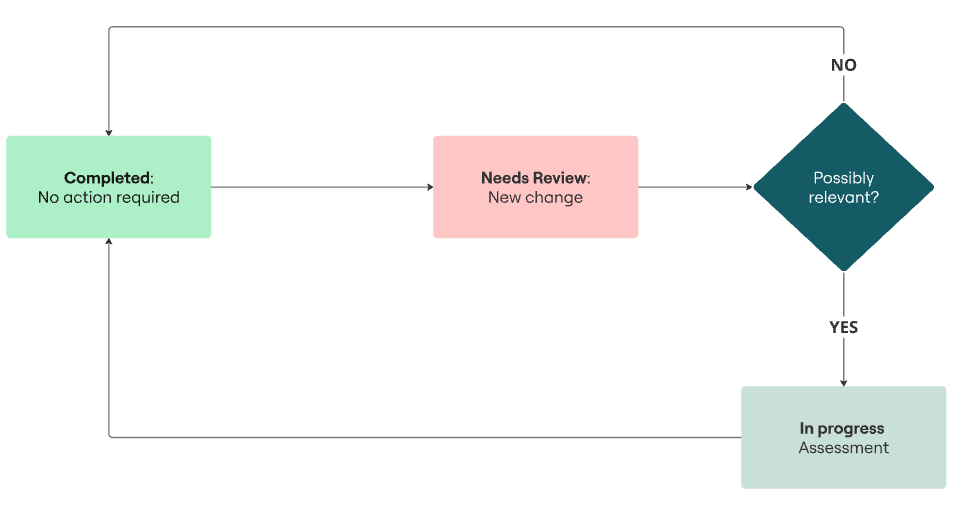
The diagram above illustrates the main status flow for a tracked regulatory document.
-
Completed – No Action Required
The document is up to date and no further action is needed.
It remains in this status until a new change or updated version is detected. -
New Change – Review Required
When the system detects an update or revision in a tracked regulation, the document status automatically changes to New change.
This means a review is required to determine whether the update is relevant to your organization. -
Possibly Relevant?
During the screening step, reviewers assess the change and decide whether it might impact your products or compliance obligations.-
If No, the document returns to the Completed state — no further action is needed.
-
If Yes, it progresses to the next phase for detailed evaluation.
-
-
In Progress
The document is under active evaluation. Assigned reviewers can upload supporting evidence, add notes, or perform a gap analysis.
Once the evaluation is completed and finalized, the document the status can be changed to the Completed status.
Screening & Full Review in Flinn
The Screening & Full Review process defines how each regulatory change is assessed — from initial detection to final evaluation.
1. Needs Review
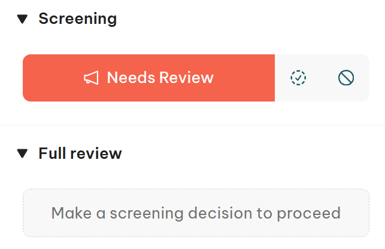
When a new or updated regulation is detected, its status is automatically set to Needs Review.
At this stage, the document requires an initial screening to determine whether the change impacts your organization or products.
-
The Screening panel displays the Needs Review status in red.
-
Reviewers can open the document, check the details, and make a screening decision to proceed.
-
No evaluation report can be created until this initial step is completed.
💡 Tip: Assign a responsible person to ensure every new change is reviewed promptly.
2. Not Relevant
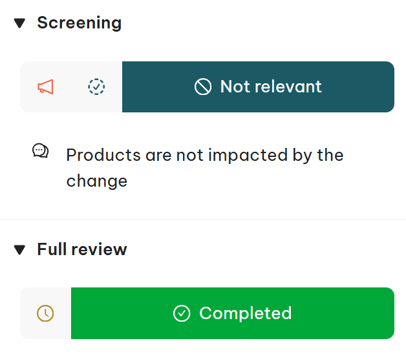
If the screening concludes that the update does not impact your products or regulatory obligations, the status changes to Not Relevant.
The Full Review section automatically switches to Completed, indicating no further action is required.
3. Relevant
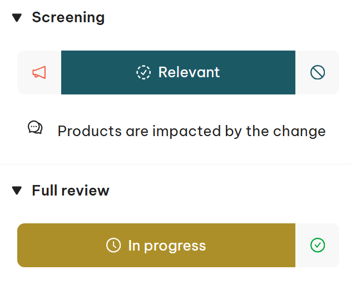
If the reviewer determines that the change does impact your organization, the status is set to Relevant.
The Full Review section automatically moves to In Progress, allowing evaluators to start the detailed assessment.
Once the evaluation is completed and approved, the document transitions back to Completed, closing the review loop.
Summary
| Stage | Description | Typical Action |
|---|---|---|
| Needs Review | New or updated regulation detected | Screening decision required |
| Not Relevant | Change does not affect your products | Automatically marked Completed |
| Relevant | Change impacts your organization | Full review In Progress |
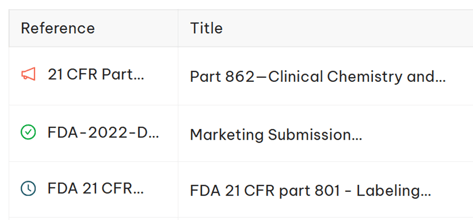
Each document’s current status (e.g., Needs Review, In Progress, Completed) is also displayed directly in the Regulatory Monitoring List.
You can easily filter the list by status to focus on documents that require review or are currently under evaluation.