![Flinn-Logo (1)-2.png]](https://help.flinncomply.com/hs-fs/hubfs/Flinn-Logo%20(1)-2.png?height=43&name=Flinn-Logo%20(1)-2.png)
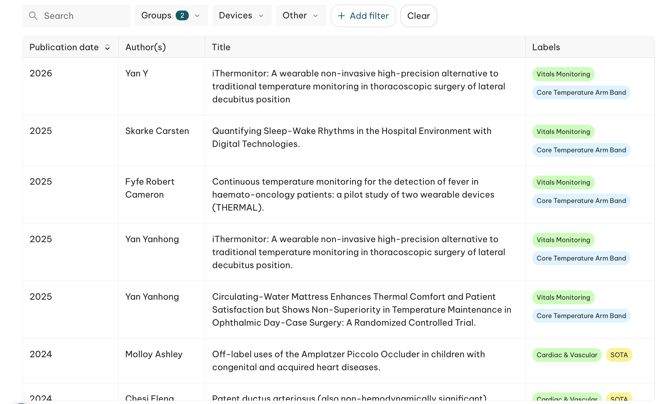
The Library is your organization's central literature knowledge hub. Every paper marked relevant during screening flows into it automatically — no manual filing and no fragmented, per-user libraries — so your whole team can browse, search and review your literature in one place.
What goes into the Library
- Automatically, from your searches — any paper marked relevant during screening is added for you.
- Manual uploads — PDFs you add directly to a search appear here too.
- Historic literature — bulk-import your team's existing library to bring past work in (see below).
Finding papers: search & filters
Search the Library by:
- Title (matches any part of the title)
- Author name
- DOI
Filter the list to narrow it down by:
- Publication date
- Labels / tags you've applied
- Extraction-field values — e.g. show only papers where a field you've configured has a given value
Viewing a paper
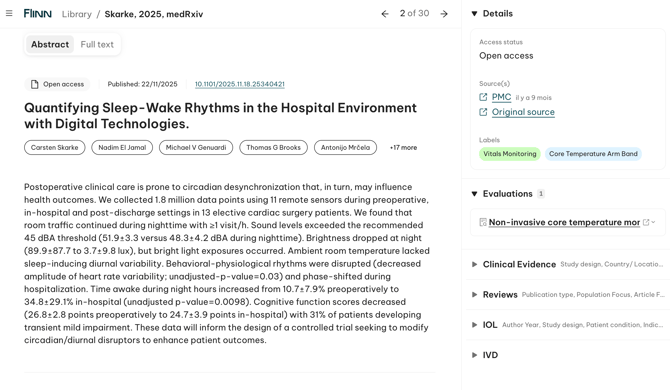
Open any paper to see its details, extractions, evaluations and full text. From the detail view you can move straight to the next or previous paper — no need to go back to the list first.
Bringing in your historic literature
You can bring your team's existing literature into the Library. Contact us to start the migration project.
Frequently asked questions
Can I search the full text of a paper?
Search currently covers title, author and DOI. For more precise results, filter within your extraction fields instead.
Do you have folders, like EndNote?
No static folders — instead, use filters and labels to slice your papers by product, indication, claim or department.
If a paper is marked relevant, can it disappear later?
No. The Library is designed to preserve your organization's knowledge — changing a screening decision elsewhere won't silently remove a paper that's already in the Library.