![Flinn-Logo (1)-2.png]](https://help.flinncomply.com/hs-fs/hubfs/Flinn-Logo%20(1)-2.png?height=43&name=Flinn-Logo%20(1)-2.png)
Characteristics of Google Scholar
-
Google Scholar is considered "grey literature" because the majority of its content is not peer-reviewed.
-
It is best suited for highly specific searches related to Post-Market
Clinical Follow-up (PMCF), safety, and performance.
-
It should not be used for background information, overviews, or state-of-the-art (SOTA) reviews.
👍 Take advantage of Google Scholar's ability to search within the full text of articles.
👍 Create short, focused queries targeting specific device names or device-specific information.
⚠️ Avoid using long date ranges, as outdated studies with many citations can dominate results. Instead, use smaller date ranges for more recent and relevant findings.
How does Flinn help you navigate Google Scholar more effectively?

- Flinn integrates Google Scholar into your searches like other data sources, streamlining the time spent on searching, screening, appraising, extracting, and documenting.
- Results available on Google Scholar can also be found on Flinn.
- Search results are ranked by relevance, prioritizing the most recent and most cited papers, just like Google Scholar.
- If a search returns too many results, Flinn displays only the first 200, preventing information overload and focusing on the most relevant data.
- By default, Flinn excludes citations and patents to ensure higher-quality results.
- Open-access (OA) papers available are directly loaded into Flinn
- Flinn's Screening assistant automatically deduplicates results from Google Scholar and PubMed within your searches, keeping your result list clean.
- Flinn's safety net makes sure results Google Scholar found once don't disappear on later runs (see below).
Building your query for Google Scholar on Flinn
-
Focus on understanding the search output rather than constructing overly complicated search strings.
- We recommend creating a separate query for Google Scholar, as Google Scholar queries should generally be simpler than those you'd write for PubMed, which supports more complex search strings.
- Apply the filter AND PUBLICATIONTYPE: ("Review") in the query to only see Reviews.
What are the supported basic operators?
| Operator | What it does |
|---|---|
| AND | Restricts the search results. |
| OR | Broadens the search results. |
| NOT | Excludes terms (translated as "-" automatically). |
| intitle | Searches for a specific word in the title. |
| source | Searches for a specific word in the source, e.g. journal name. |
| author | Searches for specific authors. |
| () | Parentheses are not supported. |
⚠️ Avoid copying and pasting search strings directly from PubMed. Instead, create customized queries tailored to Google Scholar's logic.
⚠️ Google Scholar automatically enriches all search terms with plurals and synonyms. Use the quotation marks around a term to disable automatic enrichment.
Google Scholar syntax check
The Google Scholar Safety Net
Preventing result fluctuation upon re-running your search
Google Scholar doesn't always return the same results for the same search. If you run an identical query today and again tomorrow, the second run may be missing some results that appeared in the first. These fluctuations come from how Google Scholar works, not from your query.
How the safety net protects your results
When you re-run a Google Scholar search, Flinn compares the new results with the previous ones. Any results that were found before but are missing now are caught and added back to your search, along with any new results Google Scholar returns. Results once found won't disappear because of overnight fluctuations.
When the safety net applies
- Same search string: the safety net is active as long as your search string stays the same. Flinn combines the newly found results with any previously found ones that Google Scholar missed this time.
- Extended or reduced date range: if you extend/reduce the date frame, the safety net keeps all previously found results that fall within the new date range.
When the safety net does not apply
- Changed search string: if you edit the search string itself, it's treated as a new search and the safety net starts fresh
- Completely new date range: if you change the dates to a new range with no overlap with the previous one, the safety net will not apply.
Where to see it
For full transparency, Flinn shows how many results are being kept by the safety net in two places:
- the query editor
- the search table page (Data Sources)
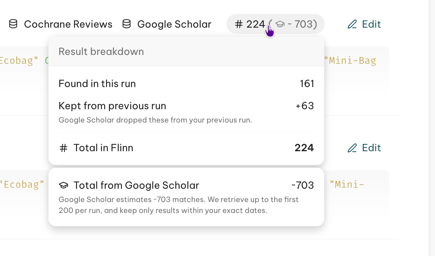
Hover over the number of results for a query to see the full breakdown.