![Flinn-Logo (1)-2.png]](https://help.flinncomply.com/hs-fs/hubfs/Flinn-Logo%20(1)-2.png?height=43&name=Flinn-Logo%20(1)-2.png)
Flinn lets you export your literature search and results in several formats — for documentation, reference management, or your report. This page walks through each option.
How to export
- Open a search whose results list has at least one result.
- Click Export in the top-right of the results table to open the Export panel.
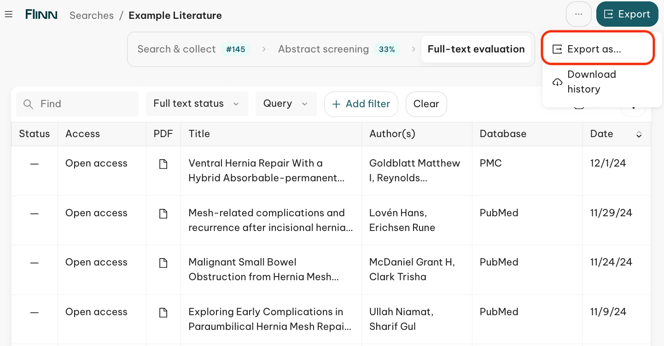
- Click on Export as..
- Choose what you want to export from the list.
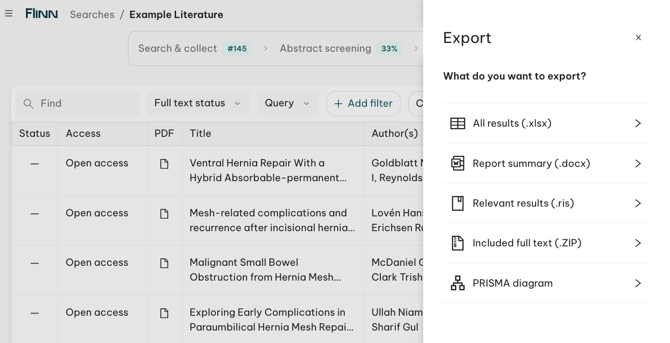
Your export options
| Export | Format | Use it to… |
|---|---|---|
| All results | .xlsx | Fully document your search — every result with screening, appraisal and extraction data, across several tabs (details below). |
| Report summary | .docx | Get a ready-to-share Word summary of your search and screening activity. |
| Relevant results | .ris | Import your included (relevant) papers into a reference manager — EndNote, Citavi, Mendeley or Zotero. |
| Included full text | .ZIP | Download all your included PDFs (open-access and manually added) in one ZIP. |
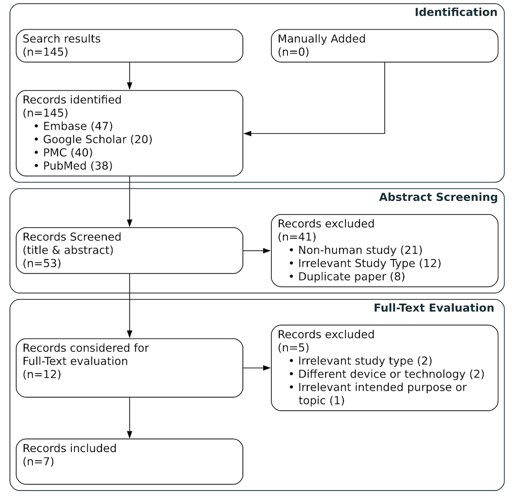
| PRISMA diagram | image | Download a PRISMA flow diagram of your screening and selection process. |
All results (.xlsx) - Excel file
The Excel workbook documents the full search across several tabs:
- Report Summary — search name, search type, the Flinn version used for the export, who exported it and when it was last run, search labels (devices/device groups/other), timespan, each query's keywords and per-source translated syntax with result counts, and a screening and full-text evaluation summary with relevance/exclusion reason breakdowns (same content as the Report summary .docx export above).
- All papers — one row per result with: Flinn Link, DOI, source ID, query name, source, result type (Query / Upload / Recommender), authors, publication date, title, article type, journal, abstract, MeSH terms, and the screening and full-text evaluation results, reasons and notes.
- Appraisal templates — one tab per appraisal template used, with each paper's key data and appraisal answers. Only appears if an appraisal template was applied to the search.
- Did you know? Flinn can calculate an evidence score based on your paper appraisal.
To activate it, select ✨Include Appraisal scoring at the moment of exporting.
Can't see this option? Ask your Solution Manager to set-it-up for you.
- Did you know? Flinn can calculate an evidence score based on your paper appraisal.
- Extraction — one tab per data-extraction template used, with each paper's key data plus every extracted field, grouped by section. Only appears if an extraction template was applied to the search.
Report summary (.docx) - Word file
A Word document summarizing your search and screening activity — ready to drop into your report or share with reviewers. It includes:
- Search details — search name, search type, last execution date/time, Flinn version used, and who exported it.
- Search labels — tagged devices, device groups, and other labels applied to the search.
- Timespan — the date range the search was run against.
- Queries — each query's title, date range and data sources, the search keywords, the translated query syntax per source, and result counts before and after deduplication.
- Screening summary — total and per-source counts of papers queried, manually added, screened, not screened, excluded, needing review, and relevant, with a breakdown of relevance and exclusion reasons.
- Full-text evaluation summary — total and per-source counts of papers relevant, with full-text evaluation, included, and excluded, with a breakdown of inclusion and exclusion reasons.
This is the same content as the Report Summary tab in the All results (.xlsx) export below, delivered as a standalone Word document.
Relevant results (.ris) - RIS file
A file to upload in your citation management tool
Exports your included papers in RIS format, compatible with any reference-management tool — EndNote, Citavi, Mendeley and Zotero — so you can bring your Flinn selection straight into your existing workflow. The file downloads directly to your computer.
Included full text (.ZIP)
Generates a ZIP containing all of your included PDFs (open-access and manually added), downloaded directly to your computer.
PRISMA diagram
Downloads a PRISMA flow diagram representing your screening and selection process (records identified, screened, included and excluded) — useful documentation for a CER or systematic review.