![Flinn-Logo (1)-2.png]](https://help.flinncomply.com/hs-fs/hubfs/Flinn-Logo%20(1)-2.png?height=43&name=Flinn-Logo%20(1)-2.png)
Welcome to the Create my 1st Literature Query page, where you will find helpful tips on how to create and optimize your search query.

Flinn: Databases & Search Query
Writing a Boolean Query
If you are not familiar with the boolean query yet, you can take a look at our Write my 1st query guide.
In short, Boolean Operators are words (such as AND, OR, or NOT) used as conjunctions to combine or exclude keywords in a search, thereby generating more targeted results. By employing these operators, you can save time and effort by filtering out irrelevant incident reports.
Basic operators currently are:
-
OR
Expand keywords together, including every report containing either one or the other keyword.
-
AND
Combine keywords together, including only reports containing both keywords anywhere in the text.
-
NOT
Exclude keywords. NOT excludes all reports containing the specified keywords.
Using quotation marks - MeSH enrichment
For Pubmed: When searching for keywords (without quotation marks), Pubmed automatically enriches the search in the background. As Flinn uses the same search logic as Pubmed, this logic is applied accordingly in Flinn.
For Example, the search: flexible AND endoscope
is translated into:
("flexibilities"[All Fields] OR "flexible"[All Fields] OR "flexibles"[All Fields] OR "pliability"[MeSH Terms] OR "pliability"[All Fields] OR "flexibility"[All Fields]) AND ("endoscope s"[All Fields] OR "endoscoped"[All Fields] OR "endoscopes"[MeSH Terms] OR "endoscopes"[All Fields] OR "endoscope"[All Fields] OR "endoscopical"[All Fields] OR "endoscopically"[All Fields] OR "endoscopy"[MeSH Terms] OR "endoscopy"[All Fields] OR "endoscopic"[All Fields])
This search logic leads to more flexibility and thus more search results.
To avoid this Mesh enrichment, you can put the keywords in quotation marks, e.g. "flexible" AND "endoscope"
Advanced Literature Operators
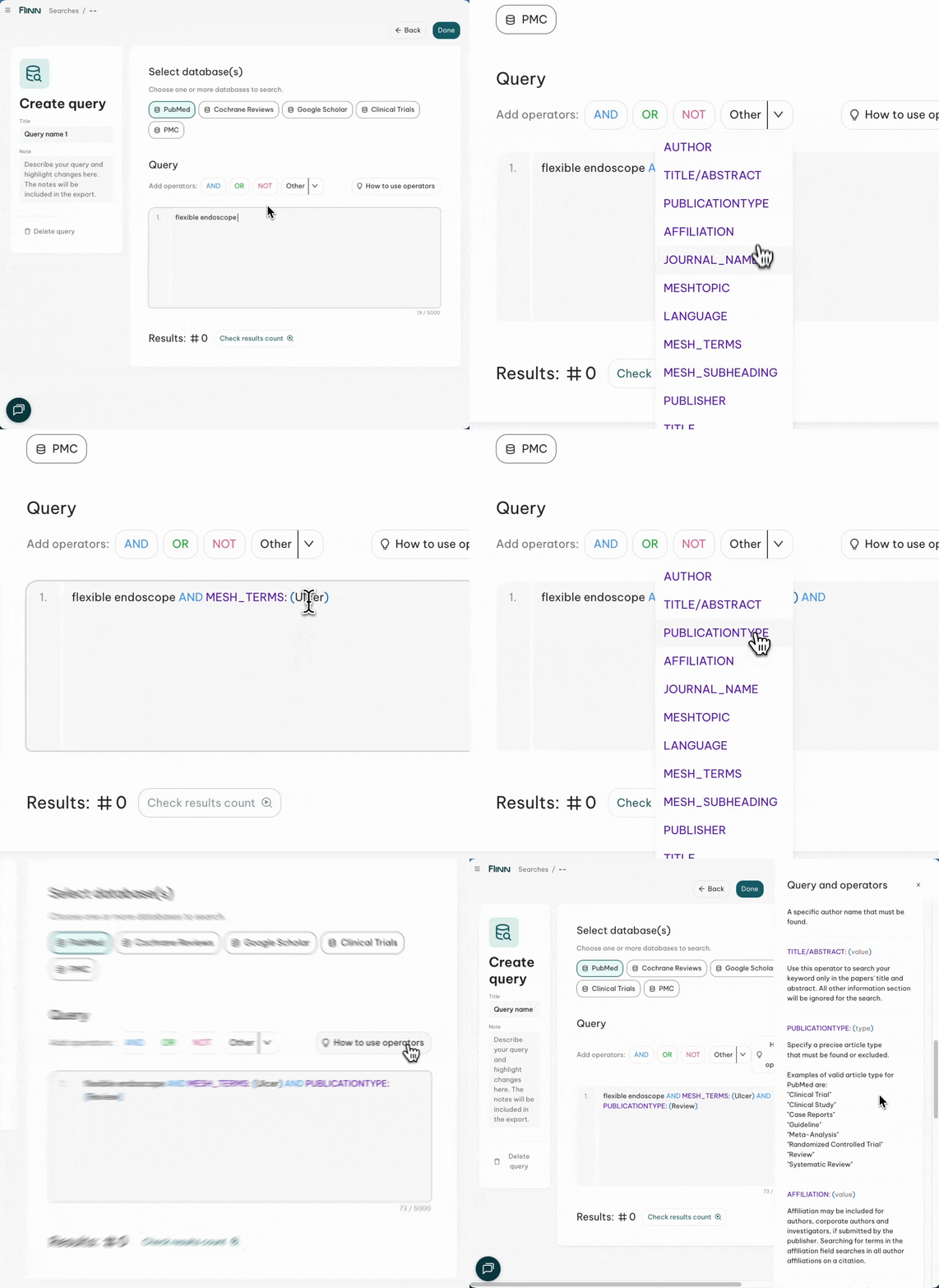
Flinn allows you to use advanced operators similar to the filtering options you might be familiar with from PubMed and Cochrane. You can find all advanced operators by clicking on "other" above the query box, or by clicking on all operators to show the side panel. Here you can find more details on how each operator is used.
Below, we will explain to you in detail how you can use the most commonly used operators:
Publication type
Use the PUBLICATIONTYPE:(type) Operator to filter for certain publication types, such as Reviews, Meta-Analysis, etc. Valid publication types depend on the database selected. Quotation marks and exact spelling must be used.
Google Scholar
- "Review"
Pubmed (non-exhaustive list)
- "Review"
- "Clinical Trial"
- "Clinical Study"
- "Case Reports"
- "Guideline"
- "Meta-Analysis"
- "Randomized Controlled Trial"
- "Systematic Review"
- + All other publication types you can use as filter in Pubmed
Cochrane
- "Review" (include this publication type to receive results from the Cochrane database, as all Cochrane Reviews are reviews)
- "Systematic Review"
- "Diagnostic Review"
- "Intervention Review"
If you would like to use additional filters, we are happy to assist you in the chat.
To filter for multiple publication types, connect them with an OR operator.
For example: "flexible endoscope" AND PUBLICATIONTYPE:("Review" OR "Clinical Trial")
MeSH Terms
This operator allows you to search for all papers that are indexed under a specific MeSH Term. MeSH terms are automatically indexed to all MEDLINE papers. To identify relevant mesh terms in your medical field, you can use the following website from NCBI: https://www.ncbi.nlm.nih.gov/mesh/
Once you have identified the relevant mesh terms for your field or product, you can use the MESH_TERMS: (terms) Operator in your query.
For example, the MeSH term "Endoscopes" can be used in the following query:
MESH_TERMS: ("Endoscopes")
Species
The Species filter restricts your results to human or animal studies. The 2 possible values are "Humans" OR "Other animals".
For example use SPECIES: ("Humans") to filter for human studies
Language
The language search field allows you to filter articles by the language in which they were published. For PubMed, specify the language using terms such as "English", "German", "French". For Cochrane, use the respective language codes: "en" for English, "de" for German, and "fr" for French.
To use the language filter in both Pubmed and Cochrane you need to use both the Pubmed and Cochrane codes:
For example: "flexible endoscope" AND LANGUAGE: ("German" OR "English" OR "en" OR "de")