![Flinn-Logo (1)-2.png]](https://help.flinncomply.com/hs-fs/hubfs/Flinn-Logo%20(1)-2.png?height=43&name=Flinn-Logo%20(1)-2.png)
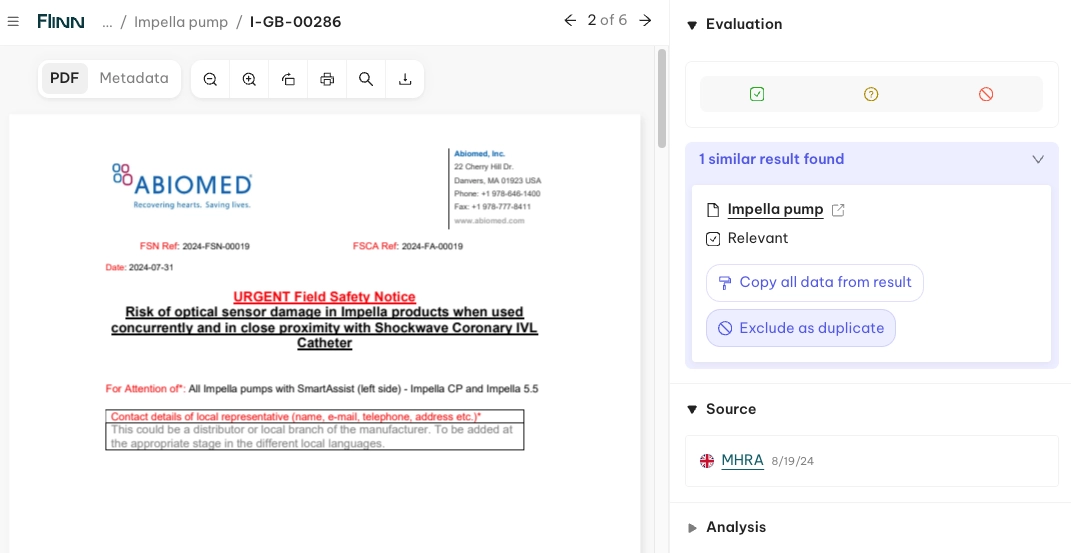
When reviewing incident reports, it's common to come across multiple entries that look nearly identical. This usually happens because manufacturers submit the same incident to several government safety databases.
That's where Similar Reports Detection comes in 🚀 — powered by our AI Assistant, it helps you:
- 🔎 Spot duplicates instantly — the system automatically flags reports that closely resemble or are duplicates of reports you've already reviewed.
- 📋 Reduce manual effort — no more cross-checking reports one by one.
- ⚡ Work faster & smarter — exclude and document duplicates with a single click.
- ✅ Stay accurate — ensure your appraisal reflects unique cases, not repeated entries.
This feature streamlines your review process, saving time while improving the reliability of your incident search.
Database coverage
⚠️ Similar-incident detection currently covers reports across the following databases: BfArM, Swissmedic, and MHRA — flagging matches within each of these databases and across them.
Accessibility
When you review reports from BfArM, Swissmedic, or MHRA, the Flinn Assistant has your back — it automatically appears to:
- 🔔 Alert you instantly — no need to manually check for overlaps.
- 🔗 Provide direct links — jump straight to related reports for easy comparison.
- 📝 Simplify documentation — record duplicates or similarities in just a few clicks.
This ensures you don't miss critical connections and keeps your review process both efficient and compliant.