![Flinn-Logo (1)-2.png]](https://help.flinncomply.com/hs-fs/hubfs/Flinn-Logo%20(1)-2.png?height=43&name=Flinn-Logo%20(1)-2.png)
Configure your appraisal
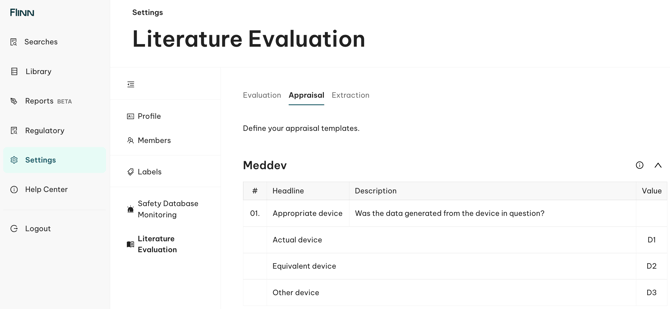
By default, the MEDDEV. 2.7.1 Rev.4 appraisal template is pre-defined for all our users, which is also including the recommendations of GHTF SG5 document N2R8:2007. This MEDDEV template is ready-to-use and requires no actions from your side.
To create a custom appraisal template, access the Settings > Literature > Appraisal space. Keep in mind that this settings space is only accessible for the admins of your organization. At the bottom of the page, after the MEDDEV pre-defined template, you will find the + Add Template button. Click on this button to start the configuration process.
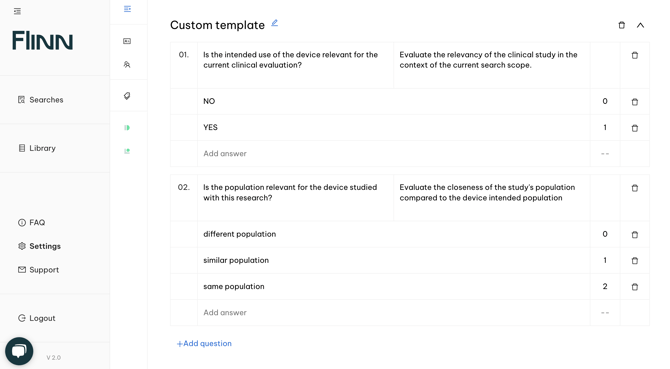
- First, you will need to name the new appraisal template and press "enter" to confirm. Use the official name you have defined in your SOP to make sure you stay compliant with your internal processes.
- Now, you can start creating questions:
- Questions are made of 1 title, 1 description and multiple answers.
- The title will be used either as the question statement (like for the MEDDEV template), or as the appraisal criteria to consider.
- The description will appear below the title and is used to define how should this question be approached. This ensures a common understanding across all team members using the same template.
- The answers are pre-defined output for the given question. You can have unlimited answers for every question, but only 1 will be selected for the appraisal.
- Answers are made of a text and a number. Both should be entered to be able to validate the answer. If you wish to ignore the number for a given answer, make a space and press "enter"
- Answers are made of a text and a number. Both should be entered to be able to validate the answer. If you wish to ignore the number for a given answer, make a space and press "enter"
- Questions are made of 1 title, 1 description and multiple answers.
Once your custom template is fully configured, you can start using it for any Literature search that you conduct.
Use the appraisal feature
You can use our appraisal system for any Literature search, directly from the full-text evaluation view. Allowing you to conduct a compliant appraisal while keeping the abstracts and full paper information in front of your eyes.
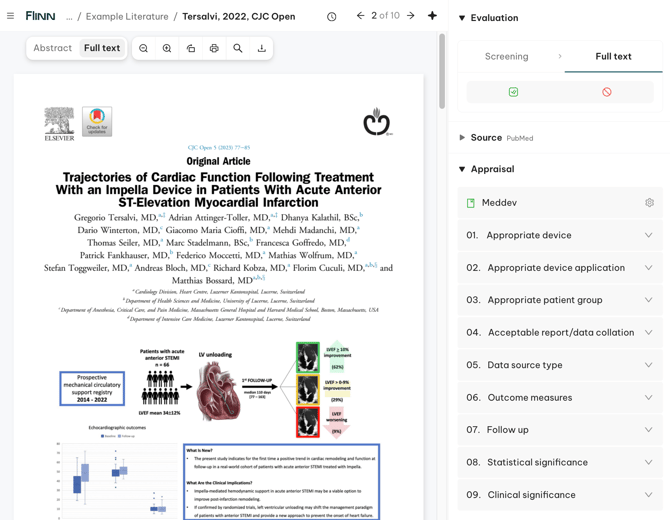
- Access the appraisal system from the right side panel, under "Appraisal".
- By default, you can use the MEDDEV template to conduct your appraisal. However, if you have configured a custom appraisal template, you can use your own template by clicking on the template name "MEDDEV" and selecting the corresponding custom template name.
- You can use unlimited templates at the same time. For example, combining Meddev + your custom template is fully supported and both will be documented in your export. Simply switch between appraisal templates by clicking on the template name or the gear sign.
- The appraisal system is a fully traceable process, with a system audit log, available in case of an issue.
- All appraisal activities will be exported as part of your documentation when exporting your search.